
PaddleOCR on Arabic scans: blank pages and the fix
By Antonin Ribeaud · Published
PaddleOCR 3.7 read a scanned page of Arabic Wikipedia for 37 seconds and returned an empty string. No error, no warning. It did the same on 15 of the 49 scanned articles in my Arabic OCR benchmark.
I blamed the ink first. The scans have grey ink on cream paper, and a blank page from a text detector usually means it could not see the text. I was wrong: all 49 scans have the same ink and the same paper (grey level 86 on 239), the 15 blank ones included.
PaddleOCR’s text detector found every line on those pages. The pages came back blank because of a limit of 1,000 in the step after it.
What the detector saw
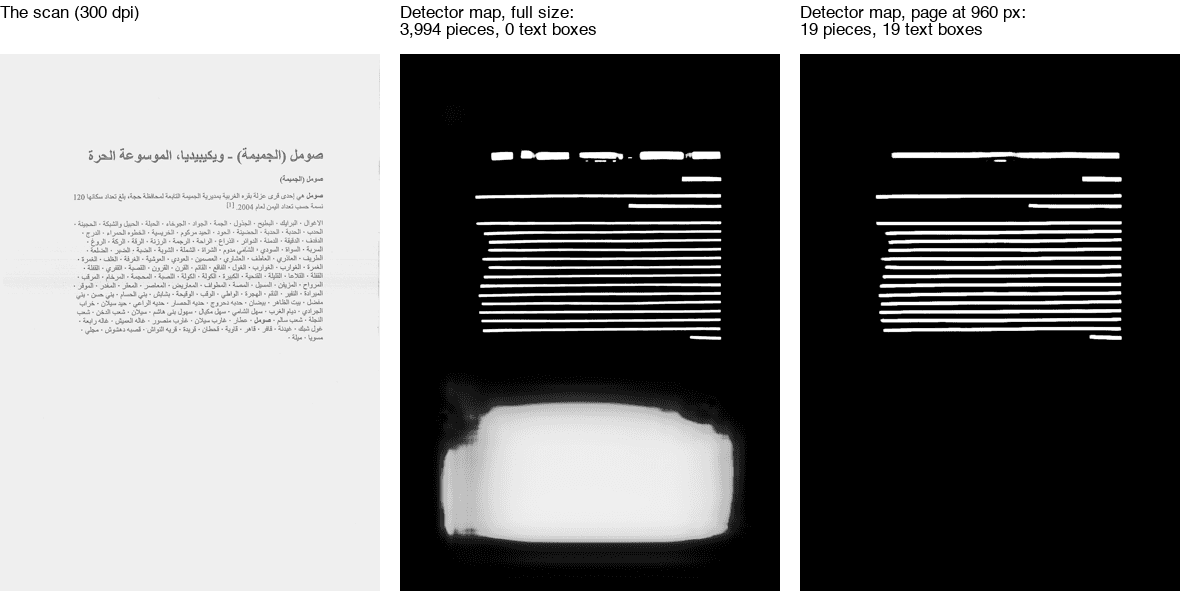 Left: a printed Wikipedia article, scanned at 300 dpi (NOD dataset, CC BY 4.0). Middle: what PaddleOCR’s text detector marked as text, at full size. Right: the same page shrunk to 960 pixels on its long side.
PaddleOCR works in two steps here. A detector scores every pixel for how likely it is to be text, which gives the maps above. Then a short routine cuts the map at a threshold (0.3 by default), traces the outline of every white area, and turns each outline into a box for the recognizer to read.
On this page the detector did its job on the text: every line is a clean white bar. It also lit up the blank paper in the bottom half. That white area is full of small holes and specks, and each one is an outline of its own. At full size, the map holds 3,994 outlines, and 3,958 of them start in the bottom part of the page.
The 1,000 limit
The routine that turns outlines into boxes, DBPostProcess in PaddleX, has a max_candidates setting of 1,000. It takes the outlines in the order OpenCV returns them and stops after the thousandth. On this page OpenCV listed the outlines of the bottom of the page first, so the 1,000 slots went to specks in the blank paper, and none of those became a box. The text lines sat at positions 3,958 to 3,987 of the list. They were never read.
I counted the outlines on the maps my diagnostic script saved, and the count matches what PaddleOCR returned on every run:
| Pages and setting | Outlines in the map | Text boxes PaddleOCR returned |
|---|---|---|
| Blank page 1, full size | 3,994 | 0 |
| Blank page 2, full size | 4,876 | 0 |
| A page that worked, full size | 718 | 37 |
| All three, threshold lowered to 0.15 | 7,314 to 15,516 | 0 |
| All three, long side shrunk to 1,920 px | 20 to 35 | 18 to 33 |
| All three, long side shrunk to 960 px | 19 to 26 | 19 to 26 |
Lowering the threshold is the usual advice when a detector misses text. Here it made things worse: more of the paper crossed the threshold, the outlines multiplied, and the page that had worked came back blank too.
Why some pages and not others? The blank ones hold less text and more empty paper: 3.2% of their pixels are ink, against 4.1% on the pages that worked (medians). More empty paper, more specks, more outlines. That is a correlation on 49 pages, and I did not test it further.
max_candidates is not one of the settings the PaddleOCR class accepts, and I did not patch the library to raise it.
The fix: shrink the page before detection
With its defaults for Arabic, PaddleOCR 3 hands the detector the full page: 2,480 by 3,508 pixels for these scans. Two settings cap the size of the page for the detection step only:
from paddleocr import PaddleOCR

ocr = PaddleOCR(
    lang="ar",
    use_doc_orientation_classify=False,
    use_doc_unwarping=False,
    use_textline_orientation=False,
    text_det_limit_type="max",       # cap the long side of the page...
    text_det_limit_side_len=960,     # ...at 960 px, for text detection only
)
page = ocr.predict("page.png")[0]
# page["rec_boxes"] and page["rec_texts"]: one box and its text per line piece.
# For Arabic, I group the boxes into lines and read each line right to left.
What the fix does on 96 real pages
I ran the shrunk setting on all 96 real scans and photos of the benchmark, and compared it with the default run:
| PaddleOCR 3.7, 96 real pages | Default | Long side at 960 px |
|---|---|---|
| Blank pages | 15 | 0 |
| Characters wrong, all pages | 36.8% | 22.1% |
| Wikipedia scans (49) | 52.2% | 22.5% |
| Book and journal scans (37) | 16.2% | 17.5% |
| Photos, one page (6) | 26.2% | 24.0% |
| Photos, open book (4) | 55.0% | 57.5% |
| Words found, any order | 55.6% | 67.1% |
| Seconds per page, on the CPU | 34.3 | 10.7 |
The 15 blank pages now come back with text, at 23.1% of characters wrong on average. The other pages barely move: the book scans and the open books get a little worse, the single photos a little better. The detector also has a smaller image to work on, so each page runs about three times faster.
It does not make PaddleOCR good at Arabic. On the 44 real pages that every engine in my benchmark finished, the shrunk PaddleOCR got 21.0% wrong, against 5.0% for Apple Live Text and 3.9% for Surya. If you are tied to PaddleOCR, use the setting. If you are choosing an engine for Arabic, start with the full benchmark.
What I did not test
- Other PaddleOCR versions and languages. PaddleOCR 3.7.0 with
lang="ar"only. - A GPU. PaddleOCR ran on the CPU of an Apple M5 Pro, since PaddlePaddle has no Apple GPU backend. The 1,000 limit does not depend on the hardware; the seconds do.
- Other sizes than 960 and 1,920 pixels, and other kinds of documents than these printed pages.
If you run PaddleOCR in a pipeline, count the pages that come back empty. Mine had no error to catch.
Questions I get about this
Why does PaddleOCR return empty results?
On my 300 dpi Arabic scans, PaddleOCR 3.7 found the text lines, but it also marked the blank paper as text. That split its detection map into thousands of small pieces, and the step that turns the map into boxes only reads the first 1,000. When the real lines come after them, the page comes back empty, with no error.
How do I fix PaddleOCR blank pages?
Shrink the page before text detection: PaddleOCR(lang='ar', text_det_limit_type='max', text_det_limit_side_len=960). On my 96 real Arabic pages it removed all 15 blank pages and cut the share of wrong characters from 36.8% to 22.1%. Lowering the detection threshold made it worse: all three test pages came back blank.
Is PaddleOCR good for Arabic?
Not in my test. On the 44 real Arabic pages that every engine finished, PaddleOCR 3.7 got 33.5% of characters wrong with its default settings and 21.0% with the page shrunk to 960 px. Apple Live Text got 5.0% and Surya 3.9% on the same pages.
Got this problem? I'll look at yours, in writing.